The ticket says "add LinkedIn messaging". You open the LinkedIn developer portal, look for a messaging product to request, and find that the self-service products are sign-in and posting. So you search for "LinkedIn messaging API key". There's no key, only a partner agreement.
The short answer: there is no public LinkedIn messaging API. The Messages API exists, but it is restricted to approved partners, and a developer without approval gets sign-in and Share on LinkedIn.
What follows is what the official API allows, what your product needs from each route, and a working send in curl, including one held at a limit. If you build for sales teams, this ticket was always coming.
Is there a LinkedIn messaging API?
Yes, on paper. LinkedIn documents a Messages API that creates a message to one or more first-degree connections, or replies to an existing conversation. The endpoint is POST https://api.linkedin.com/v2/messages, and a successful call returns a 201 with the thread in an x-linkedin-id header.
The first line of the page settles the rest: "Usage of this API is restricted to approved partners, subject to limitations via API agreement."
Even approved partners can't send on their own. Each message must be tied to a specific member action, and member actions "do not include an automated or scheduled event". The member has to opt in and take an affirmative action to send; no incentives, no HTML.
You'll read that middle rule twice, looking for the loophole. There isn't one: no background send, no sequence, no follow-up that fires while the rep is asleep.
An API that needs a human click per message isn't a messaging integration. It's a compose button with paperwork.
One more detail: the Messages page was last updated in December 2023 and is marked noindex, so search engines are told not to list it. That's one reason you may find the answer on a vendor blog (this one included) before you find it on the LinkedIn page itself.
What any developer can get without approval
Every developer gets two things without approval: Sign in with LinkedIn (OpenID Connect, profile and email) and Share on LinkedIn (w_member_social), which posts, comments and likes for a member. Everything else is gated: "Most permissions and partner programs require explicit approval from LinkedIn."
That's enough to log your user in and publish their post. It isn't enough to send their message.
The partner programmes, and what they don't include
The partner programmes add data, not sending. The sales route is the Sales Navigator Application Platform (SNAP), which needs approval as a partner. Its four permissions are r_sales_nav_analytics, r_sales_nav_display, r_sales_nav_validation and r_sales_nav_profiles, and none of them sends a message or an invitation. The talent route covers Recruiter System Connect, Apply Connect, Apply with LinkedIn and Premium Job Posting, through the LinkedIn partner application. Advertising permissions go through the Developer Portal Products tab, and Compliance is shut: "Access is closed and may not be requested."
There is no connection-request endpoint in the published LinkedIn permissions, and no InMail permission either.
So applying won't get you the feature you were asked for. Best case, you become a partner with display permissions, and the ticket is still open.
What your product needs vs what each route gives you
An account-based API takes the other route. Your end user connects their own LinkedIn account, and the API acts as that user with their own session, so it reaches what the user can reach: their messages, their invitations. (How it works has the longer version.) aux0 is one, and it is the worked example from here on. aux0 publishes this blog, so read the right-hand column as our claims, and check them against our docs.
Hold your feature list up against it. The left column says yes in full once, and it is to posting.
| What your product needs | LinkedIn's official API | Account-based API (aux0) |
|---|---|---|
| Messages | Approved partners only; each send needs the member's own action | Yes, sent as the user |
| InMail | No permission in the published list | Yes |
| Invitations with a note | No connection-request endpoint in the published permissions | Yes |
| Sales Navigator / Recruiter search | Not among the SNAP or talent permissions | Yes, with the matching seat |
| Profiles | Sign-in fields (profile, email); Sales Navigator profiles for SNAP partners | Yes |
| Posts | Yes, through w_member_social | Yes, plus comments and reactions |
The official column was checked against the LinkedIn pages in November 2026; the permissions page was last updated in June 2026. The right-hand column comes from the LinkedIn connector, and the official API comparison goes row by row.
One catch on the right: Sales Navigator and Recruiter search need the matching seat on the connected account. An account-based API reaches what your user can reach, and not one search further.
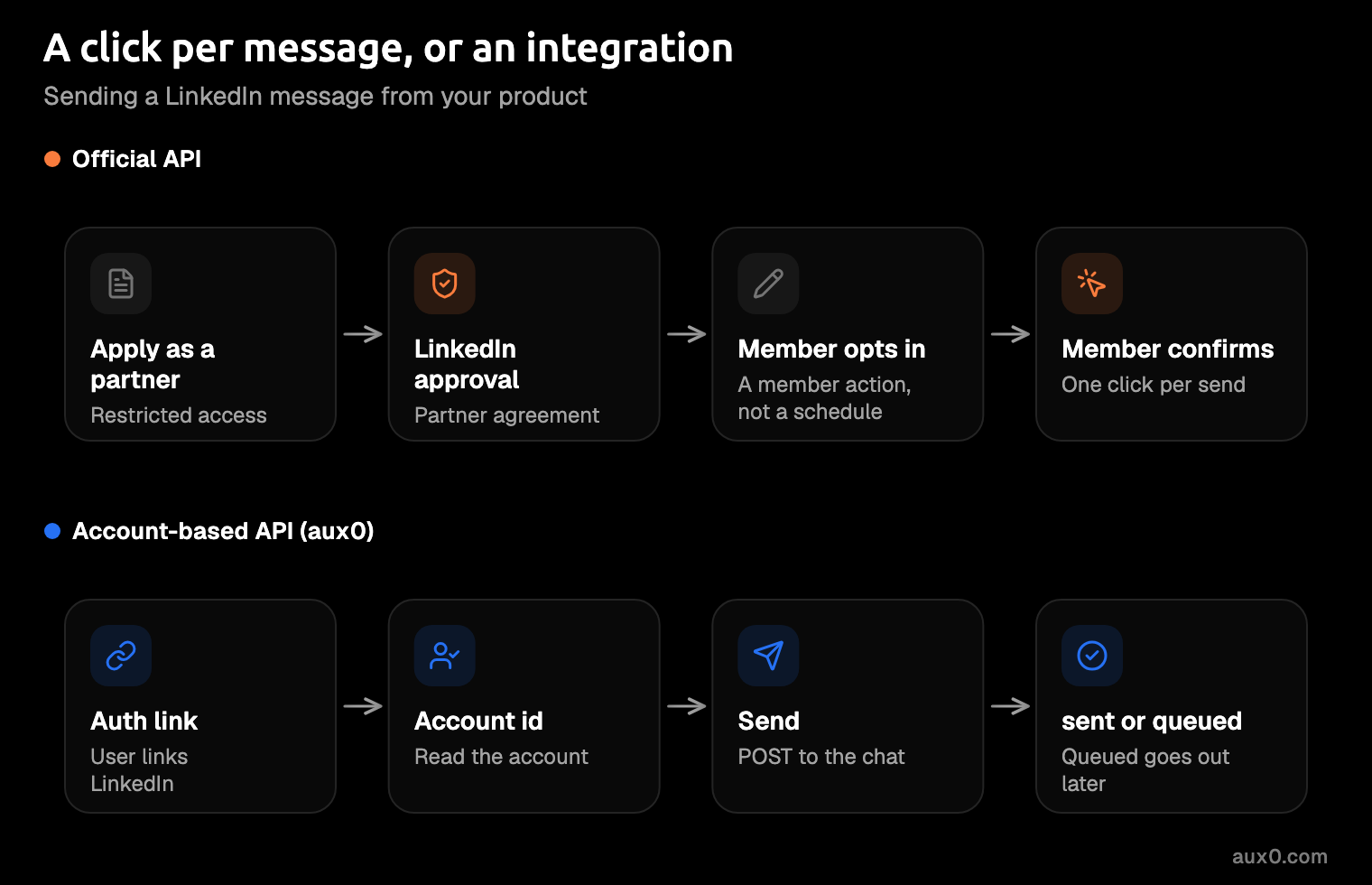
How the account-based route works: hosted auth to first send
Every account-based API has the same shape. Your user links their account on a page the vendor hosts (that is hosted auth), you get back an id for the account, and every later call names that id. The calls below are from the aux0 quickstart. LinkedIn connects through the same hosted auth page, where the user enters a password, scans a QR code or types a code.
-
Create a hosted auth link. Send your end user's id and the providers to offer. The docs' example lists mail providers; the same
providersfield is where you name the channel, LinkedIn included.curl -X POST https://api.aux0.com/v1/hosted_auth \ -H "Authorization: Bearer $AUX0_API_KEY" \ -H "Content-Type: application/json" \ -d '{"end_user_id": "YOUR_USER_ID", "providers": ["gmail", "outlook", "imap"]}'The response is the link and its expiry, as the docs show it.
{
  "id": "hal_2kd9fQmLp3",
  "url": "https://auth.aux0.com/r/2kd9fQmLp3",
  "expires_at": "2026-10-22T15:20:00Z"
}
The link lasts 24 hours by default and up to 7 days;
expires_insets it. -
Send your user the
url. They sign in on the aux0 page to one of the providers the link offers, and you get an account id and anaccount.connectedwebhook. On a LinkedIn link, that sign-in is a password, a QR scan or a code, not a consent screen like Google's, so tell your users in your UI that a login and a code step are coming. The credential never touches your servers, and that is the point: a password you never receive can't end up in your logs. The hosted auth docs cover branding the page as yours. -
Read the account id.
curl "https://api.aux0.com/v1/accounts?end_user_id=YOUR_USER_ID" \
  -H "Authorization: Bearer $AUX0_API_KEY"
It returns an
itemsarray, each item with the accountid(the docs' example isacc_8kd2nR4p),provider,handle,statusandconnected_at, plus atotal. Astatusofsyncingmeans the backfill is still running: reads work, and sends wait in the queue until it is done. -
Find the chat and send. List the chats on the account with
GET /v1/chats?account_id=acc_8kd2nR4p, take the chat id, and post your text.curl -X POST "https://api.aux0.com/v1/chats/$CHAT_ID/messages" \ -H "Authorization: Bearer $AUX0_API_KEY" \ -H "Content-Type: application/json" \ -d '{"text": "Sent through aux0."}'The response in the docs is an id, a
sentstatus and a timestamp.{ "id": "msg_2tKd9fQm", "status": "sent", "sent_at": "2026-10-22T14:33:51Z" }
Invitations with a note run on the same connected account, as the table shows. There is no SDK to install. It is plain REST, so the curl you just read is the integration, in whatever language your backend speaks.
What happens at a limit: queued, not an error
LinkedIn doesn't say how many invitations an account can send in a week: its help page gives no figure, and third-party blogs quote weekly caps that disagree with each other. So every account-based API has to decide what a send does when it would cross a limit LinkedIn hasn't published: reject it, or hold it.
Hold it. If the API returns an error, your code retries, and a retry loop can turn one busy afternoon into a restricted account. Picture the worker that catches the error and tries again until morning, each attempt one more knock on the same door.
In aux0, a send that would exceed a window is "queued, not rejected". The response carries a status of queued instead of sent, and aux0 holds the message and sends it when there is room, so there is nothing for you to retry.
Among the cases the docs name that put a send in the queue:
- A full window. The send would cross one of the limits on the account.
- The clock. The send falls outside the activity window, which runs per weekday in the timezone of the account.
- A backfill. The account is still
syncing(step 3).
Each window shows up under budget.windows with its label, used, limit and resets_at, so your UI can tell the rep why a message is waiting and when the window resets.
Unipile and Linked API leave this part out of their published pages. As of November 2026, the Unipile guide to LinkedIn APIs shows no requests, responses or quota figures, and the Linked API messaging docs list no rate limits or full response bodies. Both may handle limits well; their pages just don't say. The accounts docs list the aux0 statuses, and infrastructure covers pacing and windows.
The risk you're taking on
Any account-based route can get your user's account restricted. LinkedIn does not permit third-party software that scrapes or automates activity on its site, and says members who use it "risk having their accounts restricted or shut down". Its User Agreement, effective 3 November 2025, bars "bots or other unauthorized automated methods" in section 8.2, automated message sending included. That applies to every account-based API, aux0 included.
What lowers the risk is how the account is used, and whose it is:
- The user's own account, with consent. Your customers must get their end users' informed consent before connecting accounts.
- Pacing. Budgets, activity windows and warm-up for freshly connected accounts.
- A pinned residential IP. A residential IP is an address from a home internet provider rather than a data centre; aux0 gives each account one in its own country, pinned for life.
- Checkpoint recovery. A checkpoint is LinkedIn asking the user to confirm it is really them; the account goes to
needs_attention, and the webhook carries a code and a reconnect link. The account health docs walk through it.
All of that lowers the risk. Nobody can promise it away, and you should be wary of anyone who does.
Hosted auth answers a different risk, your own: credentials stay off your systems (step 2), and the reconnect flow is not yours to build.
Put the risk in your own terms of service before your customer finds it: whose account it is, who consented, and what happens if LinkedIn restricts it. Otherwise a customer account gets restricted on a Friday, and your support team learns what your terms say from the customer.
Why scraping isn't the answer
A scraper is a data feed, and LinkedIn can end it. Proxycurl, run by Nubela, announced its shutdown on 4 July 2025, to comply with a legal settlement with LinkedIn, which had filed suit in January 2025. Teams that built on it lost the feed, and picked up a migration project nobody had scheduled.
And a data-feed scraper like Proxycurl only reads. It can't send a message for your user, which is the whole ticket.
Build on your user's own consented session, not someone else's dataset.
What it costs
The official API is listed as free in third-party comparisons, which helps little when the price is an approval you may not get. aux0 charges a $40 monthly minimum that covers up to 10 connected accounts, and nothing per message. Each account past the first 10 is $4, and the rate drops to $3.50 from the 111th account and $3 from the 211th. Twenty-five accounts is $100 a month. One connected account is free to build on, with every provider and a monthly call cap; pricing has the cap.
A sent message costs the same as a queued one: nothing. Past the minimum, your bill moves when your customers connect accounts, not when their reps get chatty.
Back to the ticket. "Add LinkedIn messaging" can close, as long as the plan says account-based and your terms say whose account it is. The quickstart takes you from a hosted auth link to a first send, and the official API comparison has the side-by-side when someone asks why you didn't just apply.